
Inconsistency Creates Risk Inconsistent systems are harder to secure, support, and scale. Each exception increases complexity. Consistency simplifies everything. Areas Where Consistency Matters Consistency is critical in: Consistency reduces errors. Building Consistency Over Time Consistency comes from: It’s built gradually, not instantly. Managed IT Delivers Consistency Managed IT services provide the structure needed to maintain…
IT Should Support the Business—Not Compete With It When IT decisions aren’t aligned with business goals, technology becomes a constraint instead of an enabler. Alignment reduces friction. Common Misalignment Issues Misalignment often shows up as: Alignment requires communication. Building Alignment Through Planning Alignment improves through: IT becomes part of business planning. Managed IT Supports Strategic…
Spending More Doesn’t Guarantee Better IT Some businesses overspend on tools without improving outcomes. Others underinvest and accept unnecessary risk. Maturity—not spend—determines effectiveness. What IT Maturity Looks Like Mature IT environments feature: These traits matter more than budget size. Improving IT Maturity Over Time IT maturity improves gradually through: Progress beats perfection. Managed IT as…
Guessing Is Not a Strategy Without metrics, IT decisions rely on perception instead of data. Metrics provide clarity and accountability. What gets measured gets managed. Useful IT Metrics for Businesses Meaningful metrics may include: Metrics reveal patterns. Turning Metrics Into Improvement Data allows businesses to: Metrics support better decisions. Managed IT and Measurable Outcomes Managed…

Cabala Consolidated has been named a finalist in the Up and Coming MSP category for the 2026 MSP Titans of the Industry Awards. This recognition is an important moment for our veteran-owned company. It reflects the direction Cabala Consolidated has taken from the beginning: provide dependable technology support, protect the businesses we serve, and bring…
More Technology Isn’t Always Better Over time, businesses accumulate tools, platforms, and systems. Without oversight, this sprawl reduces efficiency and increases risk. Complexity slows decision-making. Signs of IT Sprawl Common indicators include: Sprawl erodes productivity. Simplifying IT Environments Reducing sprawl involves: Simplification improves reliability. How Managed IT Adds Clarity Managed IT services help businesses streamline…
Old Equipment Fails at the Worst Time Aging hardware doesn’t fail gracefully. It fails unexpectedly—often during critical moments. Deferred replacement increases risk. Problems Caused by Aging Hardware Older systems often result in: Savings from delaying upgrades are often temporary. Planning Hardware Lifecycles Effective IT planning includes: Lifecycle planning reduces surprises. Managed IT Brings Predictability Managed…
Policies Aren’t Just for Large Enterprises Many small businesses assume IT policies are unnecessary. In reality, policies provide clarity, consistency, and protection—regardless of size. Informal rules often lead to inconsistent behavior. Common Areas Where Policies Help Effective IT policies typically cover: Policies reduce confusion and risk. Turning Policies Into Practice Policies only work when they…
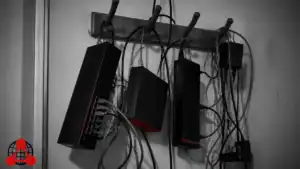
Years ago, I walked into a network closet at a local radio station that had specifically asked me never to share their name. They were perfectly fine with me sharing the state of their network, though, mostly because they knew exactly how bad it was. As I stepped into the closet, I didn't see a…
What Shadow IT Looks Like Shadow IT occurs when employees use tools or services without IT oversight. While often well-intentioned, it introduces significant risk. Convenience today can become exposure tomorrow. Risks Introduced by Shadow IT Unmanaged tools can lead to: Without visibility, risk grows quietly. Managing Shadow IT Without Slowing Work Effective IT management balances…